
There's no time to waste – let's get you started!

Download the app
You can find the SWOON app in your 'local' app store.

Create a profile
A few pictures, some text and a choice of keywords that best describe you and where you are in your life – and you're ready!

Create your own SWOONCard
Der er mange måder du kan dele din SWOON profil på. En cool og handy måde er ved at lave dit eget SWOONCard aka – visitkort! Så kan du nemt dele dit kort hvis du pludselig ser én der ser sød ud 💚
Share your SWOON🫶
Once your profile is ready, you're ready to share your SWOON!
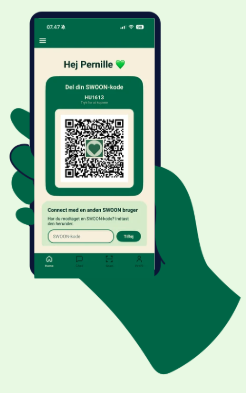
Share your SWOON QR code
Once you are logged into the SWOON app, you will find your QR code on your HOME screen. When it is scanned directly from one SWOON app to another, a connection request appears within the app. If scanned using a standard camera, the person scanning receives a pop-up message from you containing a personal SWOON code they can use to connect.
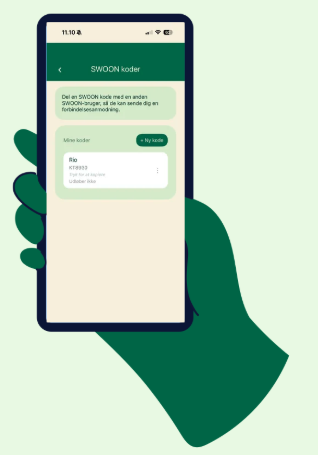
SWOON code
A SWOON code is automatically created when you sign up; you will see it on your Home page, above the QR code. You can create additional codes yourself under the menu -> ‘SWOON codes’. Click ‘+ New code’ to generate a new one. You can create multiple different codes—for example, one to use on your SWOONCard and perhaps another to share with friends so they can spread the word about your SWOON within their own networks!
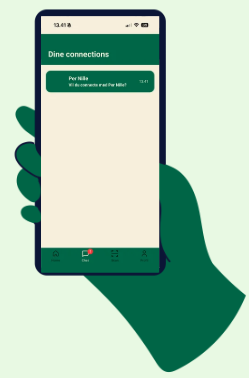
Connections
When your SWOON code is used, you receive a notification with a request to connect. Once you accept, you can chat with each other!
If you don't know the person sending the request, you can view their profile before deciding whether to connect.
That’s it!
You are now ready to take back control of your dating life! Look up on the subway – the bus – at work! Share your SWOON code with friends and family – maybe they know someone who could match you!
Attend events that facilitate dating IRL – with other people who want the same thing as you. If you don't feel like sharing your phone number during the meet-up – but are curious about the person you've met – then share your SWOON!
We're rooting for you 💚